A complete AI lesson planning guide for teachers
Discover how AI transforms teachers' lesson planning. Learn the 6-step framework to create standards-aligned lessons in minutes, not hours.
Heidi Morton • Jan 9, 2026
Teacher Workflow & Planning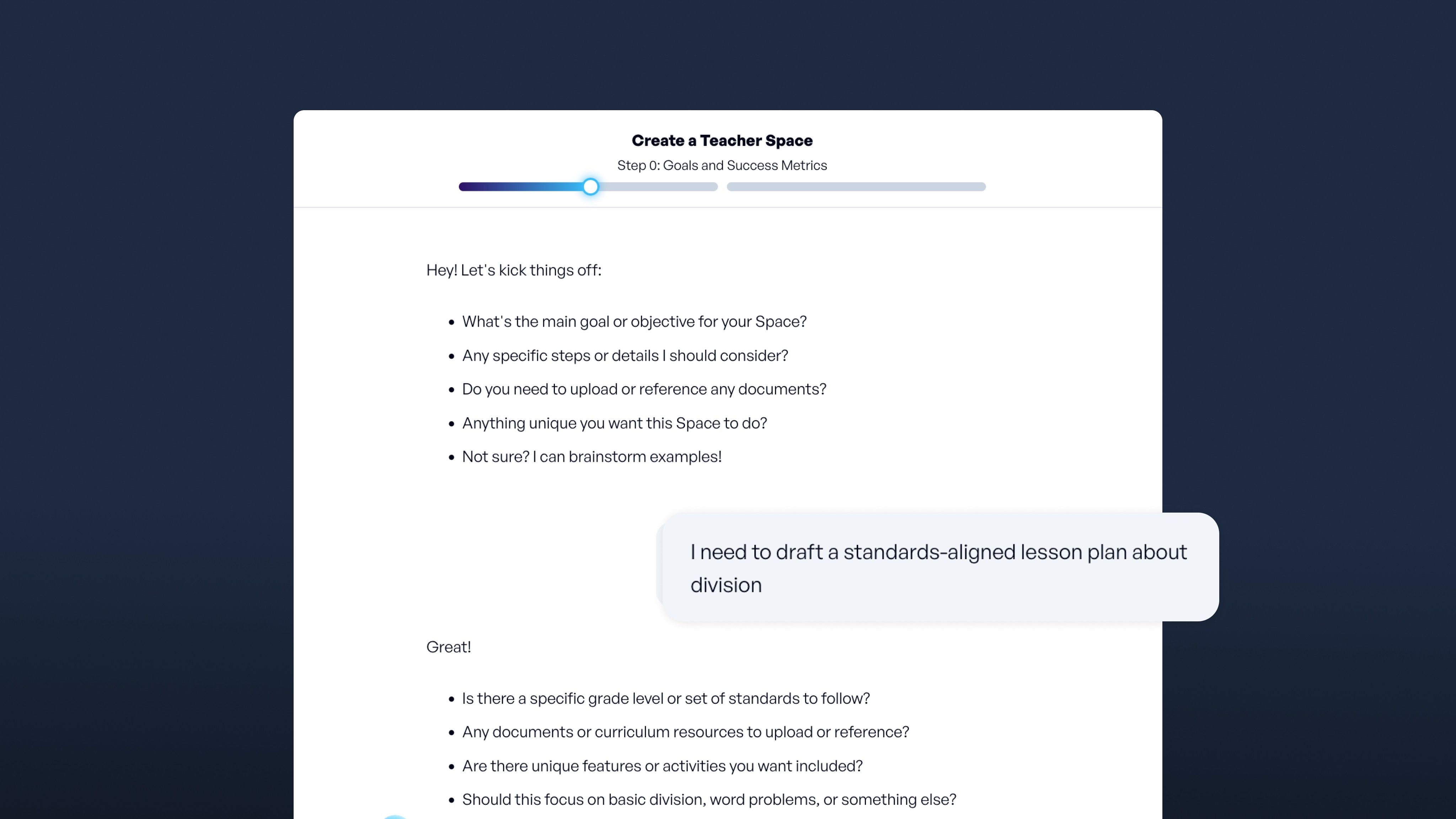
Key takeaways
-
AI lesson planning can help reduce routine tasks like drafting standards-aligned outlines and suggesting differentiated activities while keeping teachers in control
-
The 6-step AI planning framework guides teachers to clarify objectives, profile learners, create lesson skeletons, differentiate, design assessments, and iterate for continuous improvement
-
Effective AI use depends on clear, detailed prompts that include learning goals, student needs, and class logistics to produce tailored, actionable plans
-
Privacy and compliance are critical. Use tools that meet FERPA, COPPA, SOC 2, and 1EdTech standards to support education without risking privacy
You already juggle planning, grading, and endless paperwork. Late-night lesson prep shouldn't consume hours you don't have. AI tools can draft standards-aligned outlines, suggest differentiated activities, and organize resources while you maintain instructional control.
This guide presents a six-step framework adaptable to any AI tool, offering practical strategies to help you plan smarter without compromising your professional judgment.
Why AI lesson planning matters: Time, personalization, standards
Nearly 37% of teachers now use AI to draft lessons and resources. The appeal is straightforward: AI can handle routine planning tasks, giving you more time for the work that requires your expertise.
The planning challenge
Planning takes significant time. New teachers often spend 3 to 4 hours after school on the next day's lessons, while veterans balance changing rosters, grading, and compliance paperwork. Today's classrooms include English learners, students working above grade level, and peers catching up after interrupted schooling, all of whom need different pathways to the same learning goals.
How AI can help
AI lesson-planning tools step in as a collaborative assistant by:
-
Drafting standards-aligned outlines in minutes
-
Suggesting scaffolded activities for different learning levels
-
Locating and organizing resources efficiently
-
Generating formative assessments tied to objectives
You decide what to keep, tweak, or discard; your professional judgment stays at the forefront.
The impact
When routine planning tasks take less time, you gain space for formative conversations, real-time pacing adjustments, and celebrating student growth. Teachers using AI-supported planning tools report saving close to 10 hours a week.
6 essential steps to AI-guided lesson planning
This six-step framework works in any generative tool and pairs AI efficiency with your professional judgment, keeping you firmly in the driver's seat while opening space for richer student conversations.
Step 1: Clarify your objectives and standards
Start by deciding what you want students to learn. Teachers often spend time just unpacking standards without support, draining both energy and creativity. AI can shorten that process. Paste the exact standard, then ask for actionable goals and verbs drawn from Bloom's Taxonomy and DOK levels.
Prompt example: "Create 3 SMART learning objectives at the 'analyze' level of Bloom's taxonomy for a 9th-grade biology lesson on photosynthesis (NGSS HS-LS1-5)."
Within minutes, you get student-friendly targets like "compare the energy conversion in cellular respiration and photosynthesis." Before moving on, confirm that each objective addresses deeper thinking, not just recall, and decide how you'll observe success: anchor charts, exit slips, or a quick discussion.
Step 2: Profile your learners and their constraints
Clear objectives mean little without context. Class rosters shift, and gaps can widen daily. Gather reading levels, IEP accommodations, language supports, tech access, and even the broken projector in the corner. Feed those realities into your following prompt, without including student names or identifying information:
Prompt example: "Plan for 28 sixth-graders, two reading at grade 3 level, one newcomer English learner, 45-minute period, no lab computers today."
AI can propose leveled texts, sentence stems, or hands-on alternatives that honor Universal Design for Learning. Scan each suggestion for tone, cultural relevance, and feasibility in your room. Your annotated class profile becomes a reusable building block for every future lesson. Remember to delete the chat once you've copied what you need to maintain privacy.
Step 3: Generate a lesson skeleton
With goals and context locked in, ask the AI for a bare-bones outline: hook, guided practice, collaborative task, reflection, closure. Tools can return a draft in seconds. Treat it as clay, not marble. The first draft often comes across as a bit "worksheet heavy," so swap the generic "think-pair-share" for a gallery walk, quick debate, or hands-on activity.
Check pacing. Does the outline leave time for questions? Ensure materials match what you actually have on hand. Iterate with a follow-up prompt ("condense guided practice to 8 minutes; add movement") until the flow feels natural. A tight skeleton frees cognitive space for the spontaneous moments students remember.
Step 4: Differentiate and enrich
Now, bring every learner into the conversation. AI can draft tiered questions, sentence frames, or enrichment challenges at varying levels of complexity. One follow-up prompt, "Give me three tiered activities for students below, at, and above grade level", returns leveled versions of the core task.
Consider using AI tools to translate directions into multiple languages or create bilingual vocabulary cards for students whose home language isn't English. Keep rigor high by tying each scaffold back to the original success criteria.
As you sift through suggestions, ask: Does this support autonomy? Does it let advanced students stretch to DOK-3 or 4? A quick table or color-coded handout can help you track who gets what without adding chaos.
Step 5: Design assessments and rubrics
Formative checks tell you whether today's adjustments worked. AI can draft a 5-item exit ticket, a performance rubric, or even alternate-format questions to reduce language load. Request alignment to objectives and explicit descriptors for "evidence of understanding."
Prompt example: "Create a single-point rubric for the DOK-3 objective above, with student-friendly language and space for self-reflection."
Copy your learning objectives into the chat and ask for a performance rubric with four descriptors. AI aligns criteria to the verbs you used earlier, saving you the mental gymnastics of matching language. Review every item for bias, clarity, and the right cognitive demand. If you teach across multiple sections, tweak wording rather than reinventing the wheel, then save the rubric to your library for easy retrieval.
Step 6: Review, iterate, and reuse
AI drafts are only as strong as your final edit. The final pass is human-only. Read every word aloud, check for cultural relevance, and make sure pacing feels right for the kids in front of you. Before teaching, run a quick checklist:
-
Is the information presented correct?
-
Are sources credible?
-
Are these examples culturally responsive?
-
Does timing add up?
-
Was the tool used responsibly?
Regular human review catches hidden assumptions or errors. After the lesson, student work guides your following prompt: "Revise tomorrow's activity; most groups struggled to connect chloroplast structure to function."
Log what worked and why. Perhaps the hook sparked discussion, but the closure felt rushed. Update your prompt notes, tag the improved plan, and earmark it for next term. This closing loop keeps AI in the assistant role, responsive, never prescriptive. Continuous reflection turns every AI-assisted plan into a better one the next day.
AI lesson planning best practices and prompt engineering tips
Clear, thoughtful prompts turn an AI assistant into a genuine planning partner. When teachers spend extended hours after school creating lesson plans, a precise prompt can give some of that time back by reducing revisions before class begins.
-
Start with learning goals and standards. Begin each prompt with what students should know or do, and include the exact standard code. This approach mirrors the PLC question, "What do we want students to learn?" and keeps the AI focused on your learning objectives.
-
Include essential context. Briefly note reading levels, IEP goals, or language needs without revealing names or other identifiers. This extra context helps the AI suggest appropriate scaffolds while honoring privacy. Include class length, available tech, and preferred activity formats so the draft fits the reality of your schedule and resources.
-
Request variations. Ask for two versions: one at DOK 2 and one at DOK 3, for instance, so you can differentiate based on student needs without rewriting from scratch.
-
Iterate based on results. If the first response misses a nuance, reply with targeted feedback such as "shorten the hook to 3 minutes" or "add a formative check." Each cycle sharpens the plan and models reflective practice.
-
Maintain privacy compliance. Before saving, confirm that no personal data has slipped in and cross-check the content with your district's AI vetting checklist. This final review ensures both privacy compliance and content quality.
Example prompt refinement:
Before: "Plan a lesson on photosynthesis."
After: "Create a 45-minute lesson on photosynthesis for grade 7 life science, NGSS MS-LS1-6. Include a 3-minute curiosity hook, a hands-on lab using only notebooks and markers, and 2 exit ticket options at reading levels 950L and 1100L."
Troubleshooting common challenges
Even with AI support, lesson planning can drift off course. When you notice friction, pause, diagnose, and apply a quick fix.
-
Generic, one-size-fits-all output often signals that your AI needs more context about your specific classroom. Feed the AI 3 concrete details about your class culture or current unit to get more tailored suggestions.
-
Standards drift occurs when activities don't align with your learning objectives. Paste the exact standard at the top of your prompt so the model anchors every activity to your goals.
-
Unrealistic pacing happens when AI fails to comprehend your time constraints. Add calendar details like "two 45-minute periods" to nudge the plan into real classroom time.
-
Shallow differentiation can be addressed by asking for two scaffolds and one enrichment extension for the same objective, to serve your diverse learners better.
-
Missing formative checks leave you wondering if students actually grasped the content. Request an exit ticket tied to the lesson goal to build in those crucial checkpoints.
-
Privacy oversights pose serious risks. Remove student names and any identifying data before copying work samples into your prompt.
Your professional judgment remains the final filter, so you need to skim every suggestion for accuracy, bias, and fit.
Privacy, compliance, and ethical AI use
Between FERPA, COPPA, and different state privacy statutes that districts must navigate, you have the right to scrutinize any AI tool that touches student data. Reports of popular apps leaking information to advertisers highlight the stakes of getting privacy wrong.
Look for platforms that minimize data collection, use encryption in transit and at rest, don't sell student information, and use education-specific servers that don't feed prompts into public training sets. Quality platforms maintain SOC 2 compliance through regular third-party audits.
Quick classroom checklist:
✅Share only the minimum student data needed
✅Use district-approved accounts with strong passwords
✅Verify AI output aligns with FERPA before posting
✅Anonymize all examples
✅Audit and delete unnecessary stored files regularly
✅Confirm AI tools use education-specific servers, not public training systems
Choose platforms with a teacher-first design that requires your approval before AI suggestions reach students, keeping you in complete instructional control.
How SchoolAI supports AI lesson planning
SchoolAI combines multiple tools into one platform, so you can move from blank page to instruction without switching between tabs. More than 240,000 classrooms in 80-plus countries use these tools, and teachers reclaim hours every week, time they now spend with students instead of on spreadsheets. Here's how each component works together:
Spaces with Agendas: Frame each lesson with a clear structure
Spaces give your students a clear roadmap for learning. You set the goal, and the tool helps sequence warm-ups, direct instruction, collaboration, and reflection, all tagged to standards for easy documentation. With 180,000 teacher-created Spaces available, you can launch proven learning experiences instantly.
When you create a Space, Dot (SchoolAI's AI sidekick) personalizes the tasks for every learner. The system automatically adjusts reading passages, shorter texts with glossary pop-ups for emerging readers, and primary-source excerpts for advanced groups, while you focus on facilitating meaningful learning.
My Space: Draft and adapt your plans
Think of My Space as a private brainstorming room where you can draft a lesson hook, rewrite directions at a fourth-grade reading level, or create three versions of the same worksheet, no prompt engineering degree required. When prep work needs to happen fast, My Space responds to your prompt and returns a leveled outline you can adjust immediately.
PowerUps: Interactive learning tools
PowerUps add the spark students crave while providing you with real-time learning data. Launch digital flashcards, a graphing calculator, Planet Explorer game, or an instant slide deck, all scaffolded so learners who need extra help see hints while fast movers get stretch questions. These multimodal AI tools go beyond text-only chat to create hands-on, engaging learning experiences.
Current PowerUps include:
-
Flashcards and matching games for studying
-
Presentation creator (exports to Google Slides)
-
Chess game with real-time AI coaching
-
Document generator for worksheets and rubrics
-
Image generator for custom visuals
-
Translation tools supporting 60+ languages
-
Graphing calculator and mind mapping tools
Mission Control: Real-time insights
Mission Control watches the whole class in real time as students work through Spaces, flagging patterns like repeated misconceptions or sudden breakthroughs so you can jump in at the right moment. Live student progress tracking shows you exactly where each learner is in the agenda, and automatic identification sorts struggling students to the top of your "Help Center."
You can view individual student chat transcripts to see how they arrived at answers and identify misconceptions. This granular visibility transforms how you provide targeted support without waiting for end-of-unit assessments.
Organize: Centralized resource management
Organize keeps all your files in one searchable place. When you need inspiration, browse vetted slide decks, labs, and rubrics you can customize in seconds.
Discover: Teacher-created content library
Discover opens a library of more than 150,000 teacher-created assets organized by topic, grade level, and subject. Instead of starting from scratch, find proven learning experiences created and tested by real educators. You can preview any Space to test the flow and content before launching it with students.
Plan smarter
AI can help alleviate the planning burden, giving you back time to focus on what matters most: personalized instruction and meaningful student connections. Teachers using SchoolAI gain several hours back each week, and the platform's tools streamline every planning step while you maintain instructional control.
If you're interested in exploring how SchoolAI might fit into your workflow, you can create a free account to test the platform's features. Your expertise guides the process, and AI simply handles some of the heavy lifting to free up time for your next lesson.
Frequently Asked Questions
AI lesson planning can be safe when you choose platforms designed for education with proper compliance certifications. Look for tools that meet FERPA, COPPA, and SOC 2 standards, which protect student data through encryption and education-specific servers. Avoid consumer AI tools that may feed prompts into public training sets. Always remove student names and identifying information before entering any classroom context into an AI tool. Check whether your district has an approved list of AI platforms, and when in doubt, consult your technology coordinator before adopting any new tool for lesson preparation.
Effective AI prompts for lesson plans include four key elements: your specific learning standard with the exact code, the grade level and subject, relevant class constraints like time and available materials, and your preferred activity format. For example, instead of "plan a math lesson," write "create a 50-minute lesson on fractions for grade 4, aligned to CCSS 4.NF.A.1, including a hands-on activity using paper strips and an exit ticket at two reading levels." The more context you provide upfront, the fewer revisions you'll need before the lesson is classroom-ready.
AI cannot replace teacher lesson planning because it lacks the contextual knowledge, relationship awareness, and professional judgment that effective instruction requires. AI serves as a drafting assistant that handles routine tasks like generating standards-aligned outlines or suggesting differentiated activities. You still need to verify accuracy, check cultural relevance, adjust pacing for your specific students, and ensure the content matches your teaching style. Think of AI as a first-draft partner that saves time on structure so you can invest more energy in the nuanced decisions only a teacher can make.
The best AI tools for teacher lesson planning depend on your specific needs, but education-specific platforms offer advantages over general consumer tools. Look for features like standards alignment, differentiation suggestions, built-in privacy protections, and the ability to save and reuse successful prompts. SchoolAI combines lesson drafting, student-facing Spaces, and real-time analytics into a single platform designed for K-12 classrooms. Other teachers use general AI assistants for brainstorming, but these require more careful privacy management. Prioritize tools that keep you in control of instruction and integrate with your existing workflow.
Teachers using AI-supported lesson planning report saving close to 10 hours per week on routine tasks like drafting outlines, creating differentiated materials, and generating assessments. However, actual time savings depend on how you integrate AI into your workflow. The biggest gains come from using AI for repetitive planning elements while you focus on customization and student relationships. Expect a learning curve during your first few weeks as you develop effective prompting habits. Once you build a library of reusable prompts and templates, the time savings compound as you adapt proven materials rather than starting from scratch each unit.
Transform your teaching with AI-powered tools for personalized learning
See how every student is doing, and know what to do next.