Create lesson plans that work: Strategic planning for teachers
Strategic lesson planning with AI support saves time and improves student outcomes. Learn practical steps for objectives, activities, and assessments.
Cheska Robinson • Dec 18, 2025
Teacher Workflow & Planning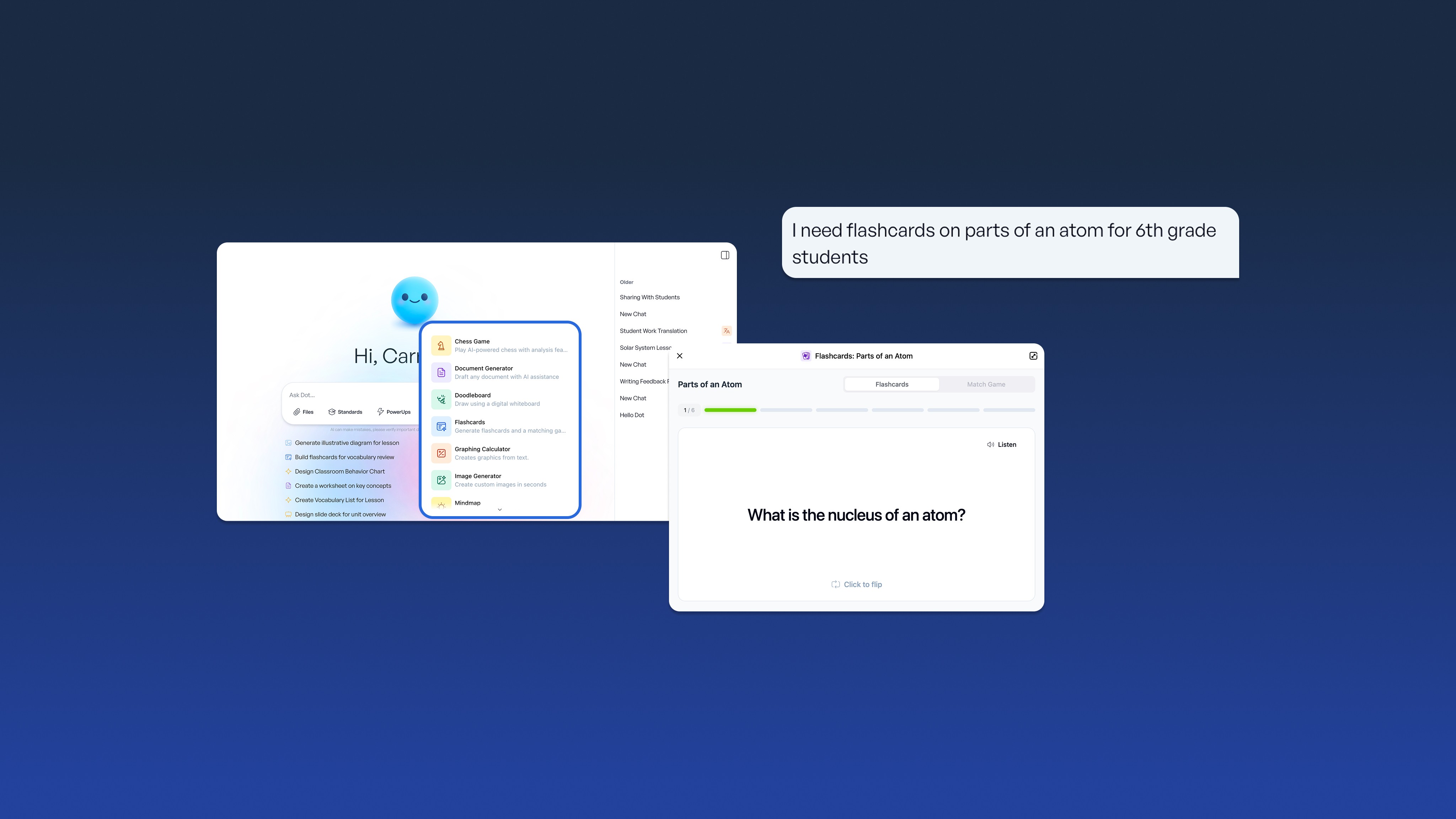
Key takeaways
-
Clear, standards-aligned objectives keep lessons focused and help students succeed by giving you and your students the same target
-
AI can draft lesson frameworks in minutes, giving you more time to refine the pedagogy and add your classroom expertise
-
Offering different ways to learn and show understanding helps every student access challenging content
-
Real-time formative checks and flexible pacing let you respond to what students actually need
You already know what effective planning looks like: clear learning goals, purposeful activities that build on each other, and formative checks that let you adjust in real time. The challenge is rarely knowing what good planning requires -- it's consistently finding the time to do it well.
Research from McKinsey suggests that up to 40% of teacher hours go to tasks like formatting materials, adapting content for different learners, and creating multiple versions of assessments. Teachers using AI strategically report reclaiming up to 10 hours weekly for student-facing work like feedback and conferencing. That's time you could spend refining your instructional approach or connecting with students.
AI can take on time-consuming drafting and formatting tasks so teachers can focus on instructional decisions that require deep expertise. Here's a strategic, teacher-centered way to use it.
1. Start with objectives that actually guide your teaching (AI can draft, you refine)
Before you pick an activity or print a worksheet, identify exactly what students should learn. A crystal-clear objective keeps your lesson on track. Lessons tied directly to curriculum requirements drive higher achievement and close learning gaps.
AI tools can translate standards into draft objectives quickly. You remain the final decision maker -- adjusting the objective's difficulty, clarity, and relevance for your students.
Keep objectives focused: one or two precise targets outperform a long list. Use observable action verbs such as "explain," "compare," "justify," or "solve."
Example
-
Vague: "Students will understand fractions."
-
Precise: "Students will compare two fractions with unlike denominators using visual models."
Use essential questions to spark curiosity: "How does energy move through an ecosystem?" invites deeper thinking than "What is a food chain?"
How to turn standards into clear learning targets using AI
-
Start with the exact standard.
-
Ask AI to identify the key action verb and concept.
-
Specify the required depth of knowledge.
-
Revise the AI-generated objective so it fits your students' readiness and instructional goals.
Translate objectives into student-friendly 'I can' statements: "I can compare two fractions, even when the denominators are different."
For example, a fifth-grade teacher might post the objective and ask, "Why do bakers need fractions to be exact?" to make the learning relevant.
2. Map activities that build understanding step by step (AI generates the skeleton, you add the magic)
Once objectives are set, outline your lesson flow. AI can draft that outline in minutes: a hook, meaningful work time, and a strong finish. You decide the pacing, choose which activities fit your students, and add the teaching moves that only you know will work.
A typical AI-generated outline might include:
-
5-minute hook with a real-world scenario
-
15-minute guided practice with visual models
-
20-minute small group exploration
-
5-minute partner reflection
-
5-minute exit ticket
You review and refine: "My class needs 10 minutes of guided practice, and the sports analogy will land better than the suggested hook."
Use a varied mix of activities
-
Hands-on tasks students can manipulate
-
Quick partner talks to process ideas
-
Graphic organizers to make thinking visible
For example, in an eighth-grade cultural studies lesson, students might rotate through a gallery walk, complete a think-pair-share, and create a collaborative poster. AI can suggest structures; you select examples and discussion strategies that suit your class culture.
Gather everything students need before class starts:
-
Materials and manipulatives
-
Sentence frames for discussions
-
Key vocabulary with definitions
AI can generate leveled readings, vocabulary lists, or sentence frames while you're prepping other parts of the lesson. You review them to ensure they match your students' actual reading levels and discussion patterns.
Balance your guidance with student ownership. Open with a focused five-minute mini-lesson. Release students into document analysis while you move around. Pull everyone back for a two-minute wrap-up. Clear transitions keep momentum: "When the timer sounds, take your notes to your partner."
3. Design checks that reveal what students actually understand (AI creates options, you choose what fits)
Every assessment -- big or small -- should align directly with your objective. Formative checks act as instructional 'pulse reads' throughout the lesson. AI can create exit tickets aligned to your objective, offering multiple difficulty levels. You select or revise the prompts that best meet your students' needs today.
Here are four research-backed strategies for AI-powered differentiation:
-
Adjust content: simplified or enriched readings, vocabulary supports
-
Change the process: allow discussion, sketching, or modeling
-
Offer product choice: podcast, slide deck, essay
-
Modify the environment: quiet corners, voice-to-text tools
For example, if many students misuse scientific vocabulary, you might ask AI for tiered practice questions and a visual glossary, then refine them to ensure they promote conceptual understanding rather than rote recall.
Tie each major task to a clear rubric. AI can draft rubric descriptors using your objective; you refine them to reflect the actual quality you expect.
4. Build flexibility into every plan
Start the lesson by estimating realistic time blocks, then add a five-minute buffer to each phase. That buffer protects you from derailment when questions or misconceptions surface.
Treat your plan as a living document.
-
If exit-ticket data shows confusion, reteach immediately.
-
If students move ahead quickly, pivot to enrichment tasks you've prepared.
After class, take two minutes to reflection on:
-
What worked?
-
Where did students struggle?
-
What needs to change tomorrow?
These quick feedback loops keep instruction responsive and student-centered.
How SchoolAI supports efficient lesson planning
If your school uses SchoolAI, here's how it can support the workflow above while keeping you in control:
-
My Space offers a clean canvas where you can type a standard (e.g., "compare fractions, grade 4") and receive draft objectives, activities, and checks for understanding aligned to your standards.
-
You can prompt the platform: "Create a 50-minute [grade level] lesson on [topic] aligned to [standard code]. Include an engaging hook, two differentiated activities, an exit ticket, materials list, and estimated times."
You review every element, adjust timing, replace activities that don't fit your students, and add your voice and teaching style.
Add class details such as reading levels or device availability to improve the relevance of AI-generated suggestions.
Privacy note: SchoolAI maintains data security with FERPA and COPPA compliance.
Turn plans into interactive lessons
When you're ready to teach, convert a lesson into a Space. Students join with a link or QR code. Dot, their AI guide, offers hints, prompts, and multilingual support -- always remaining within boundaries you define.
PowerUps like Flashcards and interactive tools keep classes engaged while you focus on meaningful coaching conversations.
Monitor learning in real time
Mission Control helps you:
-
Identify students who are stuck
-
Spot misconceptions shared across groups
-
View student thinking as it unfolds
Your data stays secure and compliant with FERPA and COPPA standards.
Take your next planning step
AI-supported planning enhances teacher efficiency while preserving the human elements that matter most: relationships, curiosity, and instructional expertise.
AI handles drafting, formatting, and resource generation. Teachers make every meaningful instructional decision.
Ready to streamline your planning process? Explore SchoolAI to see how AI-supported planning can help you create more effective lessons while keeping you firmly in control of your instruction.
Frequently Asked Questions
A typical lesson often takes 30–45 minutes to design from scratch. Using AI tools, teachers can draft a plan in 15–20 minutes, then spend 10–15 minutes personalizing it. Reusing successful frameworks and batch-planning similar lessons also builds efficiency.
Learning objectives describe what students will do and how mastery is measured. Essential questions spark inquiry and frame big ideas. Use objectives for instruction and assessment; use essential questions for engagement and discussion.
Maintain one shared objective. Adjust flexible elements by:
Providing leveled readings Offering sentence frames Allowing multiple product formats Using AI to generate tiered materials
This approach supports diverse needs without tripling the workload.
Yes. AI handles drafting; you handle decisions. You refine pacing, substitute examples, modify scaffolds, and tailor everything to your students.
Check understanding throughout each lesson using quick polls, exit tickets, or verbal responses. After class, reflect briefly and adjust the next day’s plan to prevent small gaps from growing.

About the author
Cheska Robinson
Education Specialist at SchoolAI, Former Instructional Technology Specialist
Cheska started her career as a science teacher, where hands-on learning and student curiosity shaped how she thinks about great classrooms. At SchoolAI, she partners with educators exploring practical, people-first ways to bring AI into their teaching, building professional learning that feels approachable, rooted in real classroom needs, and focused on keeping learning personal.
Transform your teaching with AI-powered tools for personalized learning
See how every student is doing, and know what to do next.