AI tools for classroom management: A research-backed guide
See which AI tools for classroom management actually help teachers. Research-backed guide covering grading automation, adaptive learning, and privacy concerns.
Avery Balasbas • Mar 13, 2026
Teacher Workflow & Planning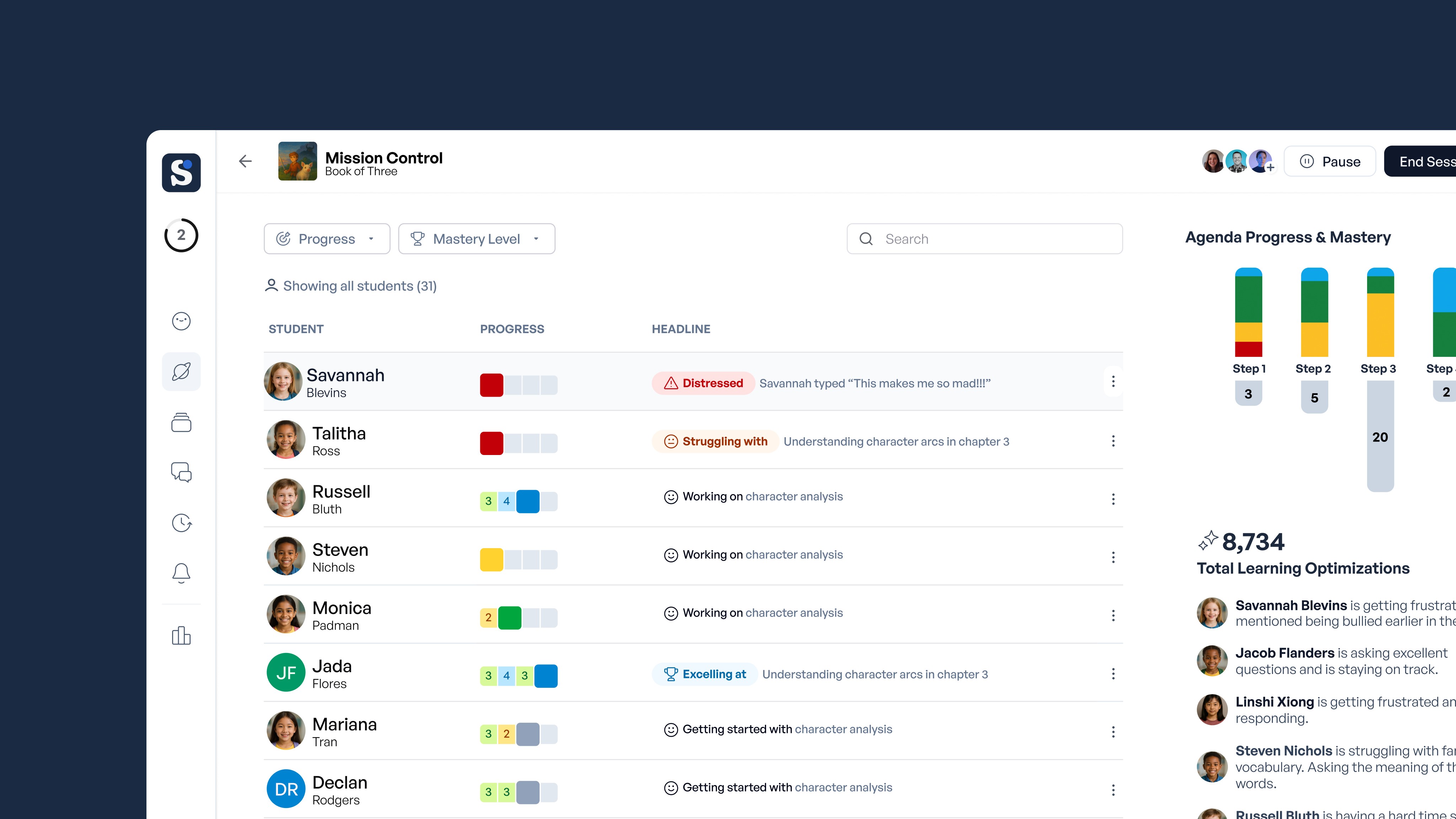
Key Takeaways
-
AI grading tools can help teachers reclaim 5+ hours weekly on multiple-choice tests and pattern-matching tasks.
-
Ongoing support works better than one-time training sessions.
-
Tools that integrate with your existing platforms reduce friction and speed up adoption.
-
Adaptive platforms with real-time feedback help students master concepts faster.
-
Most AI tools lack privacy protections, so ask vendors specific questions about data handling.
It's Wednesday evening. You have a stack of ungraded assignments, three students who need extra support, and a class that spans multiple reading levels. AI tools for classroom management promise to help—but with so many options and so much noise, it's hard to know what actually works.
Research shows that 25% of teachers say these tools do more harm than good. But the educators who see real results approach implementation differently. This guide focuses on what the research actually shows about AI classroom management tools: what works, what doesn't, and what you need to protect your students.
What Are AI Tools for Classroom Management?
AI classroom management tools are applications that use machine learning and natural language processing to handle administrative tasks, track student progress, and personalize instruction. They range from automated grading systems to adaptive learning platforms that adjust content difficulty based on individual performance.
Three Ways AI Tools Reduce Grading Time
1. Automated Grading
Teachers using AI grading tools weekly report saving an average of 5.9 hours per week. Across a school year, that compounds to roughly six weeks of reclaimed time. That's time you can redirect toward the work that actually requires your expertise: discussions, mentorship, and relationship building.
For multiple-choice assessments and pattern-matching tasks, automated grading is accurate and efficient. SchoolAI's Mission Control provides early visibility into where students are struggling, before those gaps compound.
2. Catching Learning Gaps Before They Compound
One study found that when students used AI-supported systems with real-time personalization, test scores improved from 68.4 to 82.7—approximately a 21% gain. Engagement increased alongside performance.
Effective adaptive platforms change content difficulty based on performance, provide immediate feedback rather than waiting for teacher review, and flag patterns that indicate a student is struggling conceptually, not just on individual questions.
3. Built-In Accessibility Features
Nearly 60% of teachers say AI improves the accessibility of learning materials for students with disabilities. Text-to-speech, translation across 140+ languages, and adaptive reading levels are increasingly standard in classroom AI tools.
SchoolAI Spaces support both text and voice interaction, which matters for students who process information differently or are English language learners.
What Makes These Tools Work (and What Doesn't)
Training Requirements
The research is clear: implementation success depends on ongoing support, not one-hour PowerPoint presentations. Effective AI adoption requires sustained professional learning that values teacher expertise, builds confidence with new tools, and supports experimentation.
Schools that see the best results provide teachers with time to explore tools before student use, peer coaching structures, and explicit guidance on integrating AI into existing workflows rather than replacing them.
Integration With Existing Systems
Tools that require teachers to log into a separate platform, re-enter student data, or manually transfer grades face an adoption problem regardless of their quality. The most successful implementations connect directly to Google Classroom, Canvas, or whichever LMS your school already uses.
Privacy Concerns You Cannot Ignore
Most consumer AI tools weren't built with student data protection or educational equity in mind. This is the issue that derails more AI implementations than any technical failure.
Before deploying any AI tool, ask vendors directly:
-
What student data is collected?
-
Where is it stored, and for how long?
-
Who owns the data?
-
Is it shared with third parties?
-
Does the tool comply with FERPA and COPPA?
Your district IT department should approve any tool before it touches student data. This isn't optional—it's a legal and ethical requirement.
Equity Considerations
Automated systems can perpetuate inequities in ways that are easy to miss. The Civil Rights Commission has documented how algorithmic systems can disadvantage certain student populations.
Adaptive learning systems might misinterpret culturally different problem-solving approaches. Engagement trackers might flag students who need processing time as "disengaged." Grading algorithms trained on narrow datasets may score unconventional but valid responses as incorrect.
Review AI-generated assessments and feedback for patterns that might disadvantage specific student groups. This isn't a one-time audit—it requires ongoing attention.
Implementation Strategies That Work
-
Provide real training, not one-time workshops. Budget for ongoing professional development tied directly to the tools you're deploying.
-
Choose tools that integrate with existing platforms like Google Classroom and Canvas to minimize workflow disruption.
-
Establish clear data privacy policies before adoption and communicate them to students and families.
-
Ensure adequate technical infrastructure—tools that lag or crash during instruction do more harm than good.
-
Start with one use case, measure results, then expand. Trying to transform everything at once leads to abandonment.
Types of AI Tools Worth Evaluating
-
Grading and assessment tools for automated scoring of objective questions
-
Adaptive learning platforms that adjust content difficulty in real time
-
Accessibility tools with translation, text-to-speech, and reading level adjustment
-
Student progress dashboards that surface trends before they become crises
-
AI tutoring systems that provide personalized explanations and practice
What the Research Actually Shows
AI tools work when schools invest in the right platform, provide ongoing training, and establish clear data privacy policies. The research demonstrates meaningful gains in teacher time savings and student performance when these conditions are met.
Successful teachers use AI to amplify their existing strengths—building relationships, responding to diverse learning needs, and spending more time on meaningful interactions rather than administrative tasks. The technology handles repetitive work. The teacher handles everything that requires professional judgment.
If you're ready to see what this looks like in practice, SchoolAI gives teachers real-time visibility into student AI interactions, adaptive learning tools that integrate with existing workflows, and privacy protections built for K-12 classrooms.
Frequently Asked Questions
AI tools used in classrooms include automated grading systems, adaptive learning platforms, student progress dashboards, and accessibility tools like real-time translation and text-to-speech. Popular examples include SchoolAI for personalized learning spaces and progress monitoring, as well as AI features built into learning management systems like Google Classroom and Canvas.
The 5 C's of classroom management are consistency, communication, caring, community, and choice. These principles help teachers create structured, supportive learning environments. AI tools can support these principles by providing consistent feedback, facilitating communication through translation features, and offering students choice in how they engage with content.
The best AI tool for teachers depends on your specific needs. For classroom management and personalized learning, SchoolAI offers Spaces for adaptive student engagement and Mission Control for real-time progress monitoring. The best tool is one that integrates with your existing workflow, protects student data, and comes with adequate training and support from your school.

About the author
Avery Balasbas
Education Specialist at SchoolAI, Former High School English Department Head
Avery is a former high school English department head who built his teaching practice around student voice, self-knowledge, and mastery-based learning. A Distinguished Modern Classroom Educator, he designed curriculum that asked students to prioritize self-reflection and growth over grades. At SchoolAI, he brings that same philosophy to his work with educators, blending personalized learning with practices that center who students are, not just what they score.
Transform your teaching with AI-powered tools for personalized learning
See how every student is doing, and know what to do next.